
10 Business Analysis Programs & Tools You Need to Learn in 2026
At 8:45 a.m., Amara stared at a message from her manager:
“Sales are falling. Find out why and recommend what we should do.”
It sounded simple.
It wasn't.
By noon, Amara had three spreadsheets, five conflicting opinions, an unreadable customer survey, and a meeting invitation titled Urgent Strategy Discussion.
She wasn't short of data.
She was short of clarity.
That is the real work of a Business Analyst: turning messy information and business problems into clear insights, requirements, recommendations, and decisions.
And while no software can replace critical thinking, the right business analysis tools can make it much easier to gather evidence, analyse data, map processes, document requirements, communicate findings, and support change.
Whether you're an aspiring Business Analyst, a career changer, or already working in the field, knowing which tools to learn can give you a significant advantage.
In this guide, we'll explore 10 essential business analysis tools and technologies, what they are used for, and why they matter.
What Are Business Analysis Tools?
Business analysis tools are software applications and techniques that help Business Analysts investigate business problems, analyse information, document requirements, map processes, communicate with stakeholders, and support solutions.
A Business Analyst may use several different tools during a single project.
For example:
Excel → SQL → Power BI → Lucidchart → Jira → Confluence → PowerPoint
Each tool solves a different part of the problem.
The important thing isn't learning every tool available. It's understanding when and why to use the right tool.
If you're new to Business Analysis, you may also want to read our guide to the Business Analyst career path, roles, skills and progression.
1. Excel or Google Sheets: Your Everyday Analysis Tool
Amara began with the sales data.
She opened Excel, removed duplicate records, sorted sales by region, and created a pivot table.
Within minutes, a pattern appeared.
Sales had not dropped everywhere.
They had dropped primarily in the South-West region.
This is why Excel remains one of the most useful tools for Business Analysts.
You don't always need a sophisticated data platform to investigate a business problem. Sometimes, a well-structured spreadsheet is enough to reveal the first important clue.
Excel skills Business Analysts should learn
Focus on:
- Pivot tables
- Charts and visualisations
- XLOOKUP and other lookup functions
- INDEX-MATCH
- IF and nested IF functions
- Filters and sorting
- Conditional formatting
- Data validation
- Data cleaning
- Basic forecasting
- Trend analysis
- Simple dashboards
Google Sheets offers many similar capabilities and is particularly useful for collaborative analysis.
A spreadsheet doesn't automatically create insight.
It helps you ask better questions:
Where is the problem happening?
When did it begin?
Which products are affected?
Which customers or regions are affected?
What changed before the problem appeared?
Those questions are at the heart of effective Business Analysis.
2. Power BI or Tableau: Turn Data Into a Story
Amara's manager didn't want to scroll through thousands of rows in a spreadsheet.
She wanted to understand the problem quickly.
So Amara built a dashboard in Power BI.
She created:
- A map showing declining sales by region
- A line chart showing when sales began falling
- A bar chart comparing product categories
- KPI cards showing revenue and order volume
- Filters allowing stakeholders to explore the data
Suddenly, the conversation changed.
Instead of:
“Sales are down.”
The team could say:
“Our top-selling product became unavailable in one region, and cancellations increased shortly afterwards.”
That's the power of business intelligence and data visualisation tools.
Tools such as Power BI and Tableau help Business Analysts transform raw information into visual insights that stakeholders can understand quickly.
Power BI can be particularly useful for organisations working within the Microsoft ecosystem, while Tableau is widely used for interactive data visualisation.
If you're interested in developing your analytical skills, our Data Analyst guide explores how analysts collect, clean, analyse and communicate data.
Power BI skills worth learning
Learn how to:
- Import and clean data
- Build interactive dashboards
- Create charts and KPIs
- Use filters and slicers
- Create relationships between datasets
- Write basic DAX
- Present insights to non-technical stakeholders
The goal isn't to create the prettiest dashboard.
It's to make the right business insight impossible to miss.
3. SQL: Ask the Database Directly
A few days later, Amara needed to answer another question:
Were stockouts connected to customer cancellations?
The information wasn't in her spreadsheet.
It was stored in the company's database.
This is where SQL became useful.
SQL, or Structured Query Language, allows analysts to retrieve, filter, combine and summarise information stored in relational databases.
For Business Analysts, SQL can reduce dependence on technical teams when investigating business questions.
SQL commands Business Analysts should learn
Start with:
SELECTWHEREGROUP BYORDER BYJOINCOUNTSUMAVGCASE- Basic subqueries
For example, a Business Analyst might use SQL to investigate:
- Which products generate the most revenue?
- Which customers have stopped purchasing?
- Which region has the highest cancellation rate?
- When did customer complaints increase?
- Which products are frequently out of stock?
You don't necessarily need to become a database engineer.
But understanding SQL can make you a much more independent and effective analyst.
4. Lucidchart, Microsoft Visio and Miro: Map the Process
The sales team blamed marketing.
Marketing blamed product availability.
Operations blamed the ordering system.
Everyone had an explanation.
Nobody had the full picture.
So Amara mapped the process.
Using a process-mapping tool such as Lucidchart, she documented:
Customer order → Sales confirmation → Warehouse check → Approval → Dispatch → Delivery
Then she discovered something important.
There was an additional approval step that was delaying stock replenishment.
The problem wasn't that employees weren't working hard.
The process itself was creating a bottleneck.
This is why process mapping tools are essential for Business Analysts.
They help teams visualise how work actually happens.
Popular process mapping tools
Business Analysts commonly use:
- Lucidchart
- Microsoft Visio
- Miro
- Draw.io
You should also become familiar with techniques such as:
- Flowcharts
- Swimlane diagrams
- SIPOC diagrams
- BPMN
- As-is process maps
- To-be process maps
A good process map can reveal bottlenecks, duplication, unnecessary approvals, unclear ownership and handoff problems that may be invisible in a spreadsheet.
For more context, read our guide on how Business Analysts drive digital transformation.
5. Jira, Trello and Azure DevOps: Turn Requirements Into Action
Once the team understood the problem, they needed to fix it.
That meant coordinating developers, operations teams, product managers and business leaders.
Amara used Jira to document the required system change.
The requirement was:
Create an automated alert when inventory falls below an agreed threshold.
Instead of leaving the requirement in an email, she helped turn it into actionable work.
The team could:
- Create user stories
- Define acceptance criteria
- Assign tasks
- Prioritise work
- Track progress
- Identify blockers
- Collaborate across teams
Tools such as Jira, Trello and Azure DevOps are especially useful in Agile environments.
But knowing how to create a Jira ticket isn't enough.
A Business Analyst needs to know how to write a clear, testable requirement.
For example:
Weak requirement:
“Improve stock management.”
Better requirement:
“As a regional inventory manager, I want to receive an automated low-stock alert so that I can replenish products before they become unavailable.”
The second requirement provides context, a user, an action and a business reason.
That's the difference between knowing a tool and knowing Business Analysis.
6. Confluence, Notion and SharePoint: Organise Business Knowledge
Projects generate a huge amount of information.
Requirements.
Meeting notes.
Process maps.
Decisions.
User stories.
Research.
Assumptions.
Acceptance criteria.
If that information isn't organised properly, teams can lose valuable context.
Imagine joining a project six months after it started and asking:
“Why did we make this decision?”
Nobody knows.
Or worse, five people give you five different answers.
Documentation tools such as Confluence, Notion and SharePoint help create a central source of information.
A Business Analyst can use them to document:
- Business requirements
- Functional requirements
- Meeting outcomes
- Process documentation
- Decisions
- Project assumptions
- Stakeholder information
- Success measures
- Knowledge bases
Good documentation should be:
Clear. Searchable. Structured. Current. Accessible.
Documentation isn't administrative work that sits outside Business Analysis.
It supports traceability and helps teams understand what was agreed, why it was agreed and what needs to happen next.
7. PowerPoint and Presentation Tools: Communicate the Insight
Here's something many aspiring Business Analysts underestimate:
Analysis isn't valuable if nobody understands it.
You can build the perfect dashboard, write excellent requirements and create a detailed process map.
But if you cannot explain your findings, your analysis may never influence a decision.
Amara eventually presented her conclusion to leadership.
Her message was simple:
“Sales fell because stock replenishment approvals delayed product availability in the South-West. Automating low-stock alerts should reduce stockouts and help recover lost revenue.”
That sentence mattered more than a 50-slide presentation.
Business Analysts need to communicate with:
- Executives
- Product managers
- Developers
- Operations teams
- Customers
- Project managers
- Frontline employees
The tool may be PowerPoint.
It may be Google Slides.
It may be a dashboard.
It may be a workshop.
But the underlying skill is business communication.
Learn how to explain complex information simply, adapt your message to your audience, ask strong questions and guide stakeholders toward decisions.
8. Microsoft Teams, Slack and Collaboration Tools: Work With Stakeholders
Business Analysis is rarely a solo activity.
Analysts spend significant time speaking with stakeholders, facilitating workshops, gathering requirements and clarifying assumptions.
Collaboration tools such as:
- Microsoft Teams
- Slack
- Zoom
- Google Meet
can support this work.
But the tool itself isn't the important part.
The real skill is knowing how to collaborate effectively.
For example, during a requirements workshop, a Business Analyst might need to:
- Identify the stakeholders.
- Understand their goals.
- Ask open-ended questions.
- Identify conflicting requirements.
- Clarify assumptions.
- Document decisions.
- Confirm agreement.
- Follow up with clear actions.
This is why communication and stakeholder management remain essential Business Analyst skills, even as AI and automation become more prominent.
9. Requirements Management Tools: Keep Everyone Aligned
Requirements are at the centre of many Business Analysis projects.
A requirement describes what a business, user or system needs.
Without clear requirements, teams can end up building the wrong solution.
Depending on the organisation, requirements may be managed using tools such as:
- Jira
- Confluence
- Azure DevOps
- SharePoint
- Notion
- Dedicated requirements-management platforms
The tool matters less than the analyst's ability to manage requirements properly.
You should understand concepts such as:
- Functional requirements
- Non-functional requirements
- Business requirements
- User requirements
- Acceptance criteria
- User stories
- Use cases
- Requirements traceability
- Requirement prioritisation
The objective is simple:
Make sure everyone understands what needs to be delivered and why.
10. Power BI, Excel and SQL Together: Build an Analyst's Core Toolkit
Here's the important part.
You don't need to master 30 software platforms to become a strong Business Analyst.
A practical starting toolkit could be:
Data analysis
Excel + SQL
Use these to investigate information, identify patterns and answer business questions.
Data visualisation
Power BI or Tableau
Use these to turn findings into dashboards and visual stories.
Process analysis
Lucidchart, Visio or Miro
Use these to understand how work flows through an organisation.
Requirements and delivery
Jira + Confluence
Use these to document requirements, manage work and preserve project knowledge.
Communication
PowerPoint + Teams/Slack
Use these to communicate findings, facilitate discussions and influence decisions.
This combination gives you a strong foundation without overwhelming you with unnecessary software.
Business Analysis Tools: Which Ones Should You Learn First?
If you're starting from scratch, don't try to learn everything simultaneously.
A sensible learning sequence is:
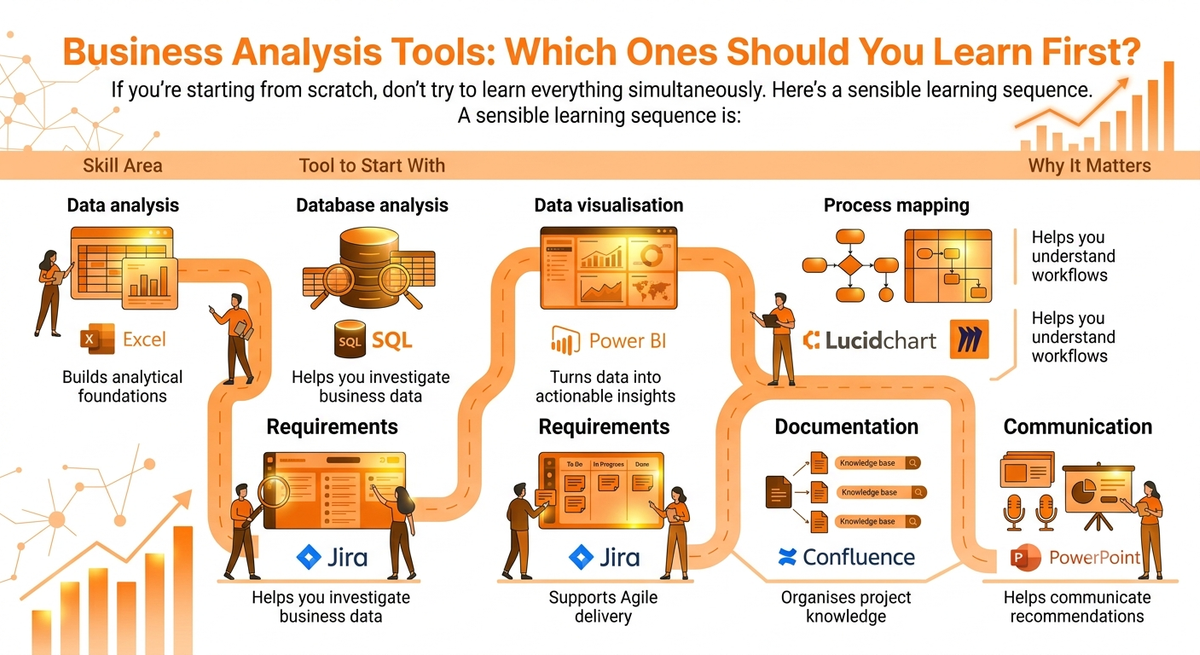
This approach is more effective than collecting software names without understanding how they fit into the Business Analysis process.
Do Business Analysts Need to Know All These Tools?
No.
This is one of the most important things to remember.
Job descriptions can sometimes make Business Analysis look like a giant checklist:
Excel + SQL + Power BI + Jira + Visio + Agile + Scrum + Confluence + BPMN + ...
Don't let that intimidate you.
Companies don't hire Business Analysts simply because they know how to click buttons inside software.
They hire analysts because they can:
- Understand business problems
- Ask the right questions
- Analyse evidence
- Identify opportunities
- Gather requirements
- Improve processes
- Communicate with stakeholders
- Recommend practical solutions
- Support successful implementation
Tools make those activities easier.
They don't replace the thinking behind them.
What Skills Should You Learn Alongside Business Analysis Tools?
Technical tools are only one part of becoming a successful Business Analyst.
You should also develop:
1. Critical thinking
Learn to challenge assumptions and investigate the real cause of a problem.
2. Communication
Learn how to explain complex information clearly.
3. Stakeholder management
Learn how to work with people who may have different priorities.
4. Requirements gathering
Learn how to discover and document what users and businesses actually need.
5. Process improvement
Learn how to identify inefficiencies and design better ways of working.
6. Data literacy
Learn how to interpret data and distinguish evidence from assumptions.
7. Problem-solving
Learn to move from “What is wrong?” to “What should we do next?”
These skills are what transform software knowledge into actual Business Analysis capability.
If you're considering Business Analysis as a career, our Business Analyst career path guide covers the progression from beginner to more advanced roles.
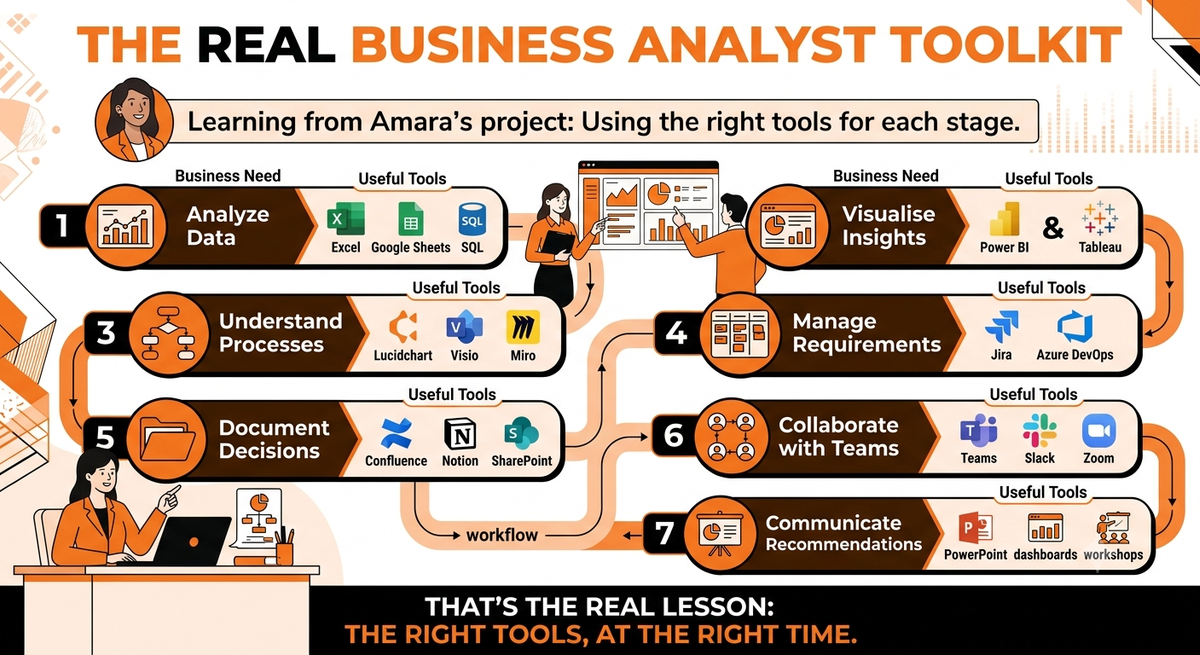
The Real Business Analyst Toolkit
By the end of Amara's project, she hadn't used every tool available.
She had used the right tools for each stage of the problem.
How to Start Learning Business Analysis Tools
If you're new to Business Analysis, start small.
You don't need to learn ten platforms at once.
Start with:
Excel → SQL → Power BI → Process Mapping → Requirements → Jira → Documentation
Then build practical projects around real business problems.
For example, instead of simply watching a Power BI tutorial, take a fictional sales dataset and answer:
Why are sales declining?
Then:
- Clean the data in Excel.
- Query the database using SQL.
- Analyse trends.
- Build a Power BI dashboard.
- Map the affected business process.
- Identify the root cause.
- Write business requirements.
- Create Jira user stories.
- Present your recommendation.
Now you aren't simply learning software.
You're practising Business Analysis.
If you're looking for a structured pathway, explore the 10Alytics Business Analyst programme to see how Business Analysis training can combine practical skills with career development.
Tools Don't Make the Analyst
Amara's final recommendation was approved.
The company automated stock alerts, reduced regional stockouts and began recovering lost sales.
Her manager sent one last message:
“Good work. Now can you look into customer retention?”
Amara smiled.
She opened a new spreadsheet.
And began again.
That's Business Analysis.
Not Excel.
Not SQL.
Not Power BI.
Not Jira.
The ability to take a messy problem, find the evidence, understand what is really happening and help people decide what to do next.
The tools simply help you do it better.
If you're serious about building a career in Business Analysis, focus on mastering the tools and developing the analytical, communication and problem-solving skills behind them.
Because the strongest Business Analysts aren't the people who know the most software.
They're the people who know which tool to use, which question to ask and what to do with the answer.
Frequently Asked Questions About Business Analysis Tools
What are the most important business analysis tools to learn?
The most useful tools to start with include Excel, SQL, Power BI, Jira, Confluence and a process-mapping tool such as Lucidchart, Visio or Miro. The best combination depends on the organisation, industry and type of Business Analyst role.
Does a Business Analyst need to know SQL?
Not every Business Analyst role requires SQL, but SQL is a valuable skill because it allows analysts to independently query and investigate business data.
Is Power BI useful for Business Analysts?
Yes. Power BI can help Business Analysts analyse and visualise data, identify trends and communicate insights through interactive dashboards.
Do Business Analysts need to learn coding?
Business Analysts generally don't need advanced programming skills. However, technical skills such as SQL, data analysis and familiarity with software development processes can make an analyst more effective.
Which tool should a beginner Business Analyst learn first?
Excel is a strong starting point because it teaches foundational data analysis skills. From there, learners can progress to SQL, Power BI, process mapping and requirements-management tools.
Are business analysis tools difficult to learn?
Most individual tools can be learned progressively. The bigger challenge is learning how to apply them to real business problems. Practical projects are often more valuable than simply memorising software features.
Ready to build job-ready Business Analysis skills?
Explore 10Alytics' Business Analyst programme and start developing the technical and practical skills employers look for.